
Description
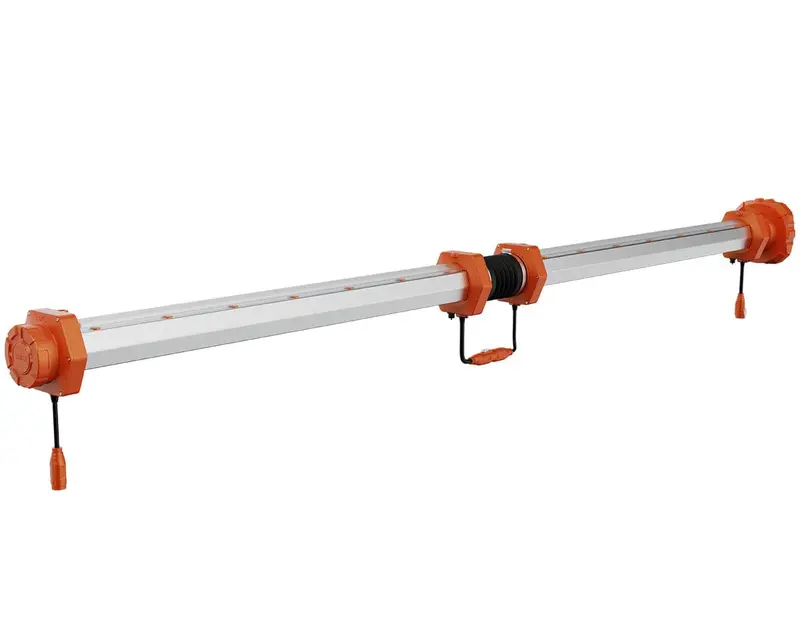
An under canopy LED grow light with integrated air circulation delivering deep red spectrum to improve lower bud density and overall yield.
The GrowPros Under Canopy Light Model 5 is built for growers who are tired of larfy lowers and uneven bud development. Designed with an 80% deep red spectrum, this LED grow light targets the lower canopy where traditional top lighting falls short. By bringing focused energy under the canopy, it increases flower density and helps lower bud sites finish closer to the top tier.
What sets this unit apart is the integrated aluminum air circulation tube. This is not just a plant LED grow light, it is a combined light and airflow system. Mounted beneath the canopy, it moves air along the row while delivering optimized spectrum to shaded zones, eliminating the need for extra ducting that blocks light or disrupts layout. Available in 4ft and 8ft options, it is built for high-density flowering rooms running rolling benches or fixed tables.
Dual Function: Yield Support + Microclimate Control
In high-density canopy environments, the under-canopy tier is where both light levels and air movement drop off first. This system is built to address both at the same time:
- Commercial-proven spectrum: Full-spectrum output with roughly 60% red content supports higher yields and helps lower flowers finish denser and larger.
- Airflow through the canopy: The aluminum ventilation tube lets air from external fans move along the row and through the canopy across the whole grow layer, and can be paired with the Quetzalcoatl Air Circulation System from Grow Pros Solutions or other compatible inline/duct fans (fans sold separately) to keep airflow more even around the crop from top to lower flowers.
Aluminum Ventilation Tube, Built to Scale
Each unit uses a built-in aluminum ventilation tube, making the fixture part of the under-canopy air system, not just a light bar. Each fixture connects to the next using a rubber duct connector to create a continuous airflow path along the row.
- Built-in aluminum ventilation tube for durability in demanding grow-room conditions
- Rubber duct connector compatibility for easy multi-unit extension along rows
- Compatible with multiple Grow Pros Solutions fan options to match different room layouts and airflow paths
DIMMABLE SPECTRUM
/* Chart Container */ #chartcontainer_4ftuclm2 .chart-container4ftuclm2 { width: 100%; margin: 10px auto; display: flex; justify-content: center; } /* Control Panels */ #chartcontainer_4ftuclm2 #control-panels4ftuclm2 { display: flex; justify-content: space-around; margin-bottom: 20px; flex-wrap: wrap; } #chartcontainer_4ftuclm2 .control-panel4ftuclm2 { width: 100%; border: 1px dashed #000000; padding: 20px; margin-bottom: 20px; border-radius: 2px; box-shadow: 0 0 10px rgba(0, 0, 0, 0.1); } #chartcontainer_4ftuclm2 .slider-title { font-family: Jost, sans-serif; font-size: 20px; margin-bottom: 15px; color: #000000; } #chartcontainer_4ftuclm2 .slider-paratitle { display: flex; flex-direction: row; justify-content: space-between; margin-top: 10px; } #chartcontainer_4ftuclm2 .slider-paratitle .current-value { text-align: right; width: 100%; font-weight: bold; color: #000000; } #chartcontainer_4ftuclm2 .slider-paratitle span { color:#cccccc; } /* Custom Process Bar Styles */ #chartcontainer_4ftuclm2 .process-container4ftuclm2 { width: 100%; height: 16px; background-color: #333333; position: relative; cursor: pointer; border-radius:2px; } #chartcontainer_4ftuclm2 .process-bar { height: 100%; background-color: #999999; width: 0; position: absolute; top: 0; left: 0; transform: translateX(0); will-change: width, transform; border-radius:2px; } #chartcontainer_4ftuclm2 .process-thumb { width: 20px; height: 20px; background-color: #046e82; border: 1px solid #000000; border-radius: 2px; position: absolute; top: 50%; transform: translate(-50%, -50%) translateX(0); left: 0; cursor: pointer; touch-action: none; transition: none; will-change: transform; } /* Responsive adjustments */ @media screen and (max-width: 767px) { #chartcontainer_4ftuclm2 #control-panels4ftuclm2 { flex-direction: column; } #chartcontainer_4ftuclm2 .control-panel4ftuclm2 { width: 100%; margin-bottom: 20px; padding:10px; } #chartcontainer_4ftuclm2 .slider-title { font-size:12px; } #chartcontainer_4ftuclm2 .process-container4ftuclm2 { height:14px; } #chartcontainer_4ftuclm2 .process-thumb { width: 22px; height: 22px; } #chartcontainer_4ftuclm2 .slider-paratitle span { font-size:10px; } } var chart4ftuclm2 = jQuery.noConflict(true); chart4ftuclm2(document).ready(function($) { // Chart.js Setup const ctx = chart4ftuclm2(‘#myChart_4ftuclm2’)[0].getContext(‘2d’); let chart; const dataset14ftuclm2 = { label: ‘Channel 1’, labels: [”,”, ‘360’, ”, ”, ”, ”, ‘395’, ”, ”, ”, ”, ”, ‘450’, ”, ”, ”, ”, ”, ‘500’, ”, ”, ”, ”, ”, ”, ”, ”, ”, ‘600’, ”, ”, ”, ”, ‘660’, ”, ”, ”, ”, ”, ”, ‘730’, ”, ”, ”, ”, ”, ‘780’, ”, ”, ”, ”, ”, ”], data: [0, 0, 0, 0, 0, 0, 0, 0, 0.2, 1, 2, 4, 14.2, 27, 14, 4, 2, 1.4, 2, 2.6, 3.1, 3.6, 4.4, 4.8, 5, 5.4, 5.8, 6.2, 6.4, 7.4, 9.4, 16, 34, 64, 99, 24, 7.4, 2.8, 1.6, 3.2, 7.2, 12, 7.2, 4, 2.1, 1, 0.4, 0.1, 0, 0, 0, 0, 0, 0 ] }; const colors = [‘#111a39′,’#111a39′,’#111a39’, ‘#111a39’, ‘#111a39′,’#111a39′,’#111a39’, ‘#111a39’, ‘#162143’, ‘#162143’, ‘#162143’, ‘#053390’, ‘#1c4a9d’, ‘#1c4a9d’,’#265aa8′, ‘#3173b8’, ‘#3698d5′,’#45bee3′,’#6fc4be’, ‘#6ebf80’, ‘#69b72d’,’#69b72d’, ‘#6bb72d’, ‘#79bc28′,’#97c626′,’#a8cc2b’, ‘#c8d933′,’#d8e036’, ‘#f1eb36’, ‘#f4c41c’, ‘#f19518’, ‘#ed761b’, ‘#e95619′,’#e62718′,’#e11713′,’#ce141b’, ‘#b91c22’, ‘#a91f24’, ‘#951e23’, ‘#851123’, ‘#7f191e’, ‘#7d191d’,’#76161b’, ‘#6a1216’, ‘#631014’, ‘#5f0e12’, ‘#51050a’,’#440104′, ‘#380103′,’#230304′,’#221714’, ‘#221714’, ‘#221714′,’#221714’, ‘#221714’, ‘#221714′,’#221714’, ‘#221714′,’#221714’, ‘#221714’]; let scale1 = 1; function createGradient(ctx, chartArea, colors) { const gradient = ctx.createLinearGradient(chartArea.left, 0, chartArea.right, 1); colors.forEach((color, index) => { gradient.addColorStop(index / (colors.length – 1), color); }); return gradient; } function createChart(labels, combinedData) { if (chart) { chart.destroy(); } chart = new Chart(ctx, { type: ‘line’, data: { labels: labels, datasets: [ { type: ‘line’, label: ‘PPF’, data: combinedData, borderWidth: 0.1, backgroundColor: function(context) { const chart = context.chart; const {ctx, chartArea} = chart; if (!chartArea) { return null; } return createGradient(ctx, chartArea, colors); }, borderColor: function(context) { const chart = context.chart; const {ctx, chartArea} = chart; if (!chartArea) { return null; } return createGradient(ctx, chartArea, colors); }, fill: true, tension: 0.4 // Smoothing effect }, { type: ‘line’, label: ‘Outline’, data: combinedData, borderWidth: 2, backgroundColor: ‘transparent’, borderColor: ‘#000000’, // Outline color fill: false, tension: 0.4 } ] }, options: { responsive: true, maintainAspectRatio: true, scales: { x: { stacked: true, grid: { display: false // Hide y-axis grid lines }, ticks: { color: ‘#000000’, autoSkip: false, // Prevent auto-skipping of labels maxRotation: 0, // Prevent label rotation minRotation: 0, // Prevent label rotation maxTicksLimit: labels.length // Ensure all labels are shown }, border: { width: 2, color: ‘#000000’ // Change x-axis line color } }, y: { beginAtZero: true, max: 100, // Set a static max value for y-axis to accommodate added values grid: { color: ‘#000000’, }, border: { width:2, color: ‘#000000’ // Change y-axis line color }, ticks: { color: ‘#000000’, callback: function(value) { return value % 20 === 0 ? value + ‘%’ : ”; // Custom label formatting } } } }, events: null, radius: 0, plugins: { filler: {propagate: true}, // Enable filler legend: { display: false }, }, animation: { duration: 0 // Animation duration for smoother updates } } }); } function updateChart() { const scaledData1 = dataset14ftuclm2.data.map(value => value * scale1); const combinedData = scaledData1; if (chart) { chart.data.datasets[0].data = combinedData; chart.data.datasets[1].data = combinedData; // Update outline dataset chart.options.animation.duration = 300; chart.update(); } } function createProcessBar(containerId, valueId) { const $container = chart4ftuclm2(`#${containerId}`); const $controlPanel = $container.closest(‘.control-panel4ftuclm2’); const $thumb = $container.find(‘.process-thumb’); const $bar = $container.find(‘.process-bar’); const $currentValue = chart4ftuclm2(`#${valueId}`); let dragging = false; let containerOffset = $controlPanel.offset().left; let containerWidth = $controlPanel.width(); let processContainerWidth = $container.width(); let currentW = 250; // Set initial wattage to 250W // Update container metrics on resize function updateContainerMetrics() { containerOffset = $controlPanel.offset().left; containerWidth = $controlPanel.width(); processContainerWidth = $container.width(); setBarByWattage(currentW); } chart4ftuclm2(window).on(‘resize’, updateContainerMetrics); // Initialize container metrics updateContainerMetrics(); // Function to set the bar and thumb position based on wattage function setBarByWattage(wattage) { currentW = Math.min(Math.max(wattage, 0), 250); // Use 250W as max const touchRatio = currentW / 250; const thumbLeft = touchRatio * processContainerWidth; // Update bar width $bar.css(‘width’, `${touchRatio * 100}%`); // Update thumb position $thumb.css(‘transform’, `translate(-50%, -50%) translateX(${thumbLeft}px)`); // Update displayed value $currentValue.text(`${currentW.toFixed(0)}W`); // Update the corresponding scale variable and chart scale1 = currentW / 250; updateChart(); } // Function to handle the dragging logic function handleDrag(pageX) { const newLeft = pageX – containerOffset; const clampedLeft = Math.min(Math.max(newLeft, 0), containerWidth); const touchRatio = clampedLeft / containerWidth; const newWattage = touchRatio * 250; // Use 250W as max setBarByWattage(newWattage); } // Throttle dragging using requestAnimationFrame let rafId = null; function onDrag(pageX) { if (rafId) return; rafId = requestAnimationFrame(() => { handleDrag(pageX); rafId = null; }); } // Mouse events $thumb.on(‘mousedown’, function(e) { e.preventDefault(); dragging = true; }); chart4ftuclm2(document).on(‘mousemove’, function(e) { if (dragging) { onDrag(e.pageX); } }); chart4ftuclm2(document).on(‘mouseup’, function() { dragging = false; }); // Touch events bound to control panel $controlPanel.on(‘touchstart’, function(e) { e.preventDefault(); dragging = true; const touch = e.originalEvent.touches[0]; onDrag(touch.pageX); }); chart4ftuclm2(document).on(‘touchmove’, function(e) { if (dragging) { const touch = e.originalEvent.touches[0]; onDrag(touch.pageX); e.preventDefault(); } }); chart4ftuclm2(document).on(‘touchend touchcancel’, function() { dragging = false; }); // Click on the control panel to set the thumb position $controlPanel.on(‘click’, function(e) { const pageX = e.pageX; onDrag(pageX); }); // Initialize the bar to 250W setBarByWattage(currentW); } // Initialize the chart function initializeChart() { const scaledData1 = dataset14ftuclm2.data.map(value => value * scale1); createChart(dataset14ftuclm2.labels, scaledData1); } // Initial load initializeChart(); // Create Process Bars for Channel 1 createProcessBar(‘process-container14ftuclm2’, ‘global-value14ftuclm2’); // Debounced Resize Handler to Redraw Chart on Screen Size Change let resizeTimeout; chart4ftuclm2(window).on(‘resize’, function(){ clearTimeout(resizeTimeout); resizeTimeout = setTimeout(function(){ if(chart){ chart.resize(); } }, 200); // Adjust the timeout as needed }); });
Slide the Bar to See How the Spectrum Changes
0W
125W
Usage Guidelines

Features
- Dual-function airflow and under canopy grow light with universal-fit dimensions
- Commercial proven spectrum significantly increases yields and lower bud structure and size
- Air flow fans blow air through the undercanopy and reduce microclimates
- Waterproof and easy to clean
- Power chain and data control through the same connection
- Multiple options for fans
- Can be used on any bench system, but we suggest using it with the GrowPros Bench Bridge Stands
What’s Included?
- GrowPros Under Canopy Light Model 5 Air Circulation
Download Resources
- 4FT Spec Sheet
- 8FT Spec Sheet
Interconnect Cables and Power Cords
Additional components can be ordered separately since quantities will depend on the total number of lights and selected configurations.
Note also that the lights connect together without interconnecting cables. The interconnecting cables are only needed to create the U where you have 2 rows of lights on a single bench OR if you need a space (up to 4 feet) between under canopy lights.
See the above chart for limitations on how many lights can be connected on 1 power cable.
Order your cords and cables below:
- Interconnect Cables
- Power Cords
- Power Adaptors (Convert 120V/240V into 277V Male Plug)
Controller
A controller with a RJ-12 signal is required to operate. We recommend the GrowPros controller
Explore more from our collection.


Reviews
There are no reviews yet.